Sharing a single item
Everything in your box is private, unless you decide otherwise per item.
The switch on each item
The page of a book, film, album or concert has a Sharing block. Turn Public on and the item gets its own link: ten random characters followed by the title, something like mycultbox.com/s/a1b2c3d4e5-tirza. Anyone with that link can see the page; anyone without it can't.
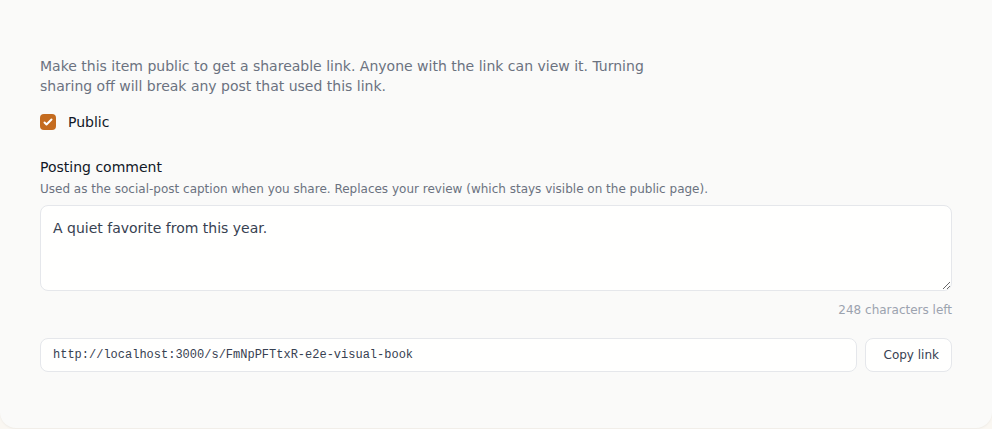
Below the switch you can add a caption of up to 280 characters. That's the line that sits at the top of your public page, and it's also what we suggest as the text when you go to share.
What's on that page
The public page is deliberately bare: cover, title, creator, year, your star rating, your caption, and below that your most recent review of the item. Your notes, your tags, your companions and the rest of your library stay private.
Share cards
As soon as an item is public a Share button appears, and MyCultBox renders two images to go with it: a portrait one at 1080 × 1350 for your feed, and a landscape one at 1200 × 628 that social networks show when someone pastes your link. Behind that button you'll find both cards, a ready-made caption, and a button to copy the link. Change the title, your rating or the date later and the cards are redrawn.
Public means public
The link isn't guessable, but shared items do appear in our sitemap — so search engines can find and show them. Don't share anything you'd rather not have found.
Turning sharing off
Flip the switch back and the page is gone straight away; existing links go dead. The link itself stays attached to the item: make it public again later and exactly the same link works again.
Want to share your whole year rather than one item? That's Sharing your recap.